oah helps you build an AI development workflow that fits you and keeps changing as AI improves. It is a working reference and a guide you can adapt.
A useful result needs more than generated code: the scope must be clear, the changes checked, and decisions kept for the next session. oah connects those steps so one request can carry through the work with a record of what happened.
002 / Why it keeps changing
Older rules and skills can hold a newer model back or make its results worse. Defaults should be easy to understand and change; a rule that gets in your way is a design problem to fix.
Keep the parts that help, remove what no longer helps, and revise the workflow as your tools improve. You can start with the full setup or take only the impact map, wiki, leases, evidence gates or review loop that your project needs.
003 / Why Claude builds and Codex reviews
This split comes from the author's own experience, not a measured comparison: Claude fills in details a beginner might miss in a first version; Codex checks and corrects within a fixed scope.
The current commands run Claude Code and Codex CLI. The ideas can also be adapted to another tool or harness, with one AI or several. Give each stage to the AI that suits your work.
004 / From one request to a checked change
Describe the result you want in plain language. The AI records the goal and scope, checks what the change touches, reserves its paths and chooses the tools for the task. Claude builds; Codex reviews, corrects and reviews again.
Gates record the checks and their results. The project wiki keeps the decisions and reasons beside the code. In v0.3.0, optional TypeSafe Jev can judge difficulty for model selection; rules remain the fallback when it is unavailable or uncertain.
005 / The decisions stay with you
You ask, answer when the AI needs a decision, and confirm before the change lands. If the same problem repeats or the work reaches a design choice, the loop stops to ask you.
Ask “Is the review done?” or “Did all the gates pass?” and inspect the evidence. The final confirmation belongs to you; writing code, checking it and approving its landing are separate steps.
006 / Free, open source, yours to adapt
oah is free, open-source software under the MIT license. Read the source, change it and bring the useful pieces into your own workflow. Your AI services and any optional services use their own accounts and billing.
The current v0.3.0 release supports macOS and native Windows, and expects familiarity with git and pull requests. Install it, run oah init in your project, then try the small hello-oah example. The installation and documentation sections explain each step.
Open Agent Harness · for Claude Code and Codex CLI.
Does coding feel hard?
Just ask,
then confirm.
Your AI builds, reviews and records the work: it checks what a change touches, reserves the paths it edits, keeps the wiki and the gate evidence, and runs Codex review until nothing blocks. You answer when a decision is needed, then confirm before it lands.
Without a harness, every session starts over. Every single time.
Less context to repeat. Less work to redo. Follow each step to see the saved work add up.
0%30%
Tokens & time savedUp to · calculated
Calculated allocation of 30 saved units from a 100-unit workload; actual savings vary by task and environment.
A receipt for the work you save
Intent & scope01 / 06
Explain the same task again→
Reuse the written intent+6%
Saved so far6%
Impact map02 / 06
Read unrelated files→
Follow the affected paths+8%
Saved so far14%
Project wiki03 / 06
Rediscover past decisions→
Keep the decision and its reason+5%
Saved so far19%
Review loop04 / 06
Rebuild the review context→
Carry findings into correction+4%
Saved so far23%
Evidence & gates05 / 06
Repeat unaffected checks→
Keep evidence bound to its inputs+5%
Saved so far28%
Next session06 / 06
Reconstruct the handoff→
Continue from the recorded state+2%
Saved so far30%
Total saved30%
Required final checks stay in place.
Youask · answer · confirm
Your AI carries the work. You keep the decisions.
A harness is the set of tools, rules and records around an AI coding assistant. oah connects them so one plain request is carried through scope, build, review, checks and records — and stops for you when a decision is needed. Take the parts that help, or start with the whole setup and make it yours.
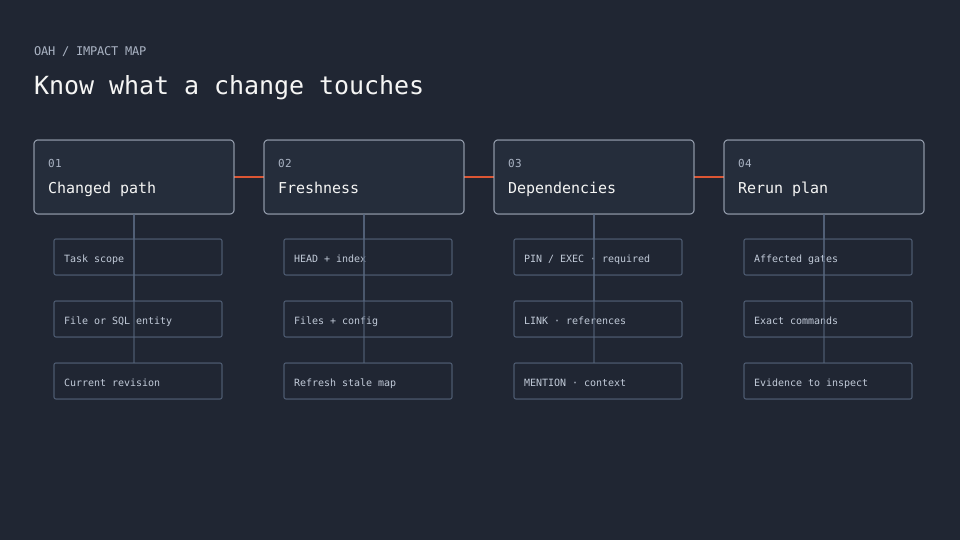
When your AI changes a file, the impact map lists the related code, documents and checks to rerun. Results are ranked pin, exec, link and mention, so the gates that pin or run a changed path come first. The map is bound to HEAD and its inputs, and oah never uses a stale map silently.
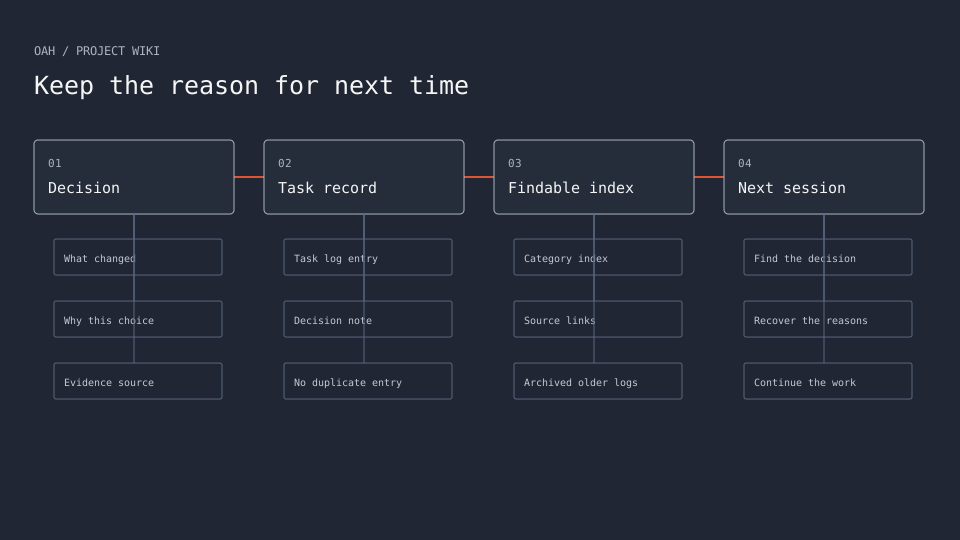
oah init creates docs/wiki/, an Obsidian-compatible folder where your AI keeps the task history, decisions and reasons beside the code. oah wiki maintain writes each task's log entry and index line, oah finish checks that it ran, and the next session has a record to read instead of asking you to explain everything again.
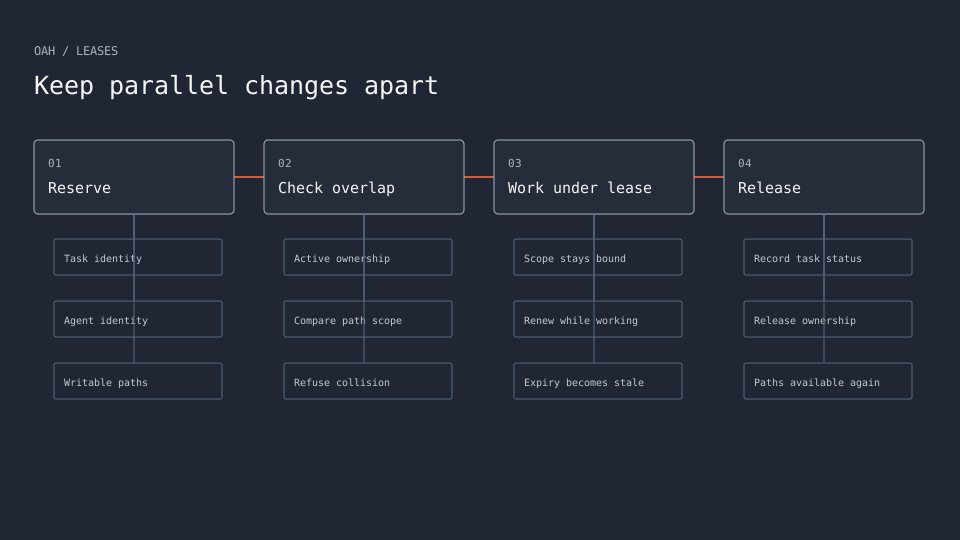
A lease reserves the paths one task may change, so two AI sessions never edit the same files by accident. An overlapping lease is refused with OAH_LEASE_CONFLICT, naming the holder. When the task finishes, oah compares the files really changed with the scope, because a lease cannot stop an editor from writing elsewhere.
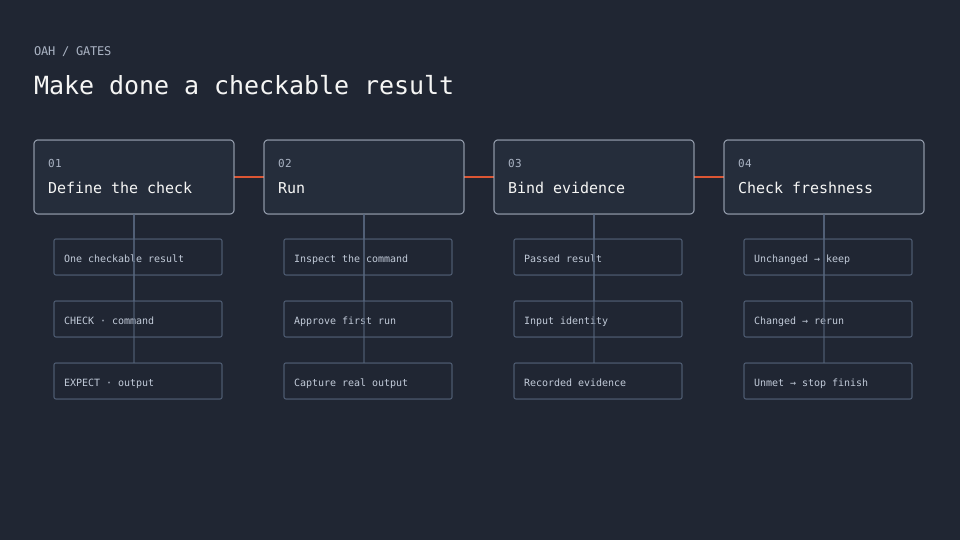
A gate turns “done” into a check with recorded evidence: one checkable result, the command that proves it and the output it must produce. oah gates check runs the CHECK lines through unlazy after you approve them, ticks passing gates with evidence and binds them to their inputs. oah finish refuses unmet gates.
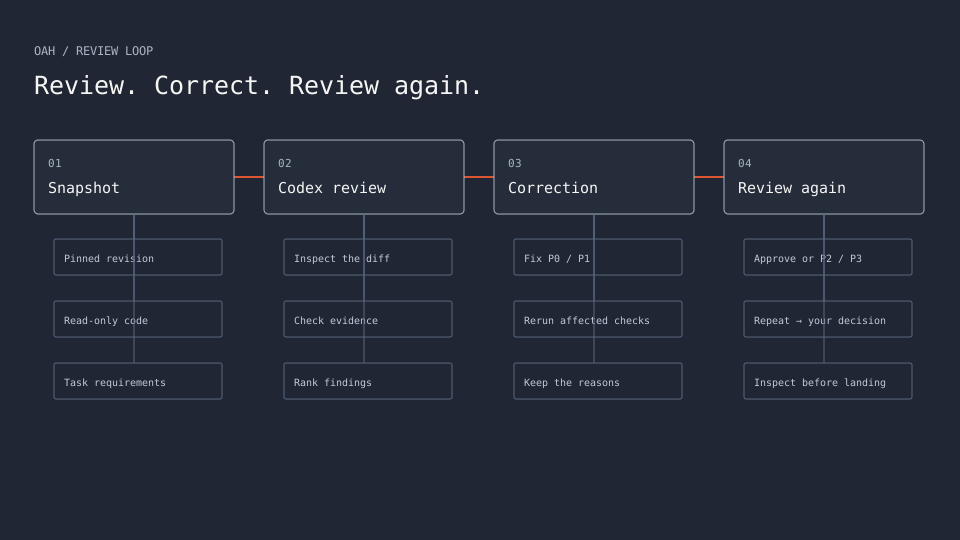
Claude Code builds the first version; Codex CLI reviews a clean, read-only snapshot, corrects the blocking findings and reviews again. There is no fixed number of rounds: a series ends when a round approves or leaves only P2/P3 follow-ups. A repeated problem or a design choice stops the loop for your answer, and a round limit is optional.
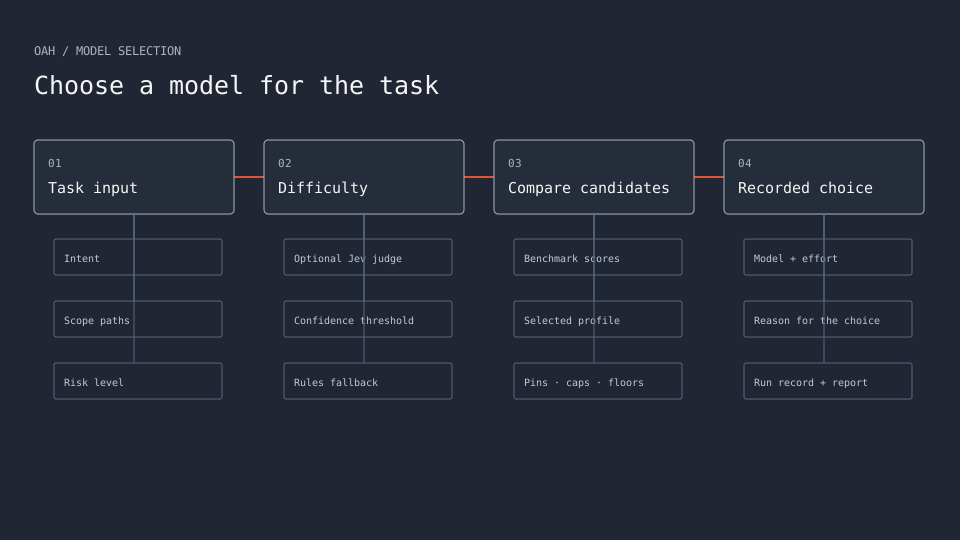
TypeSafe Jev is the recommended, optional judge. It re-orders chosen skills and, in v0.3.0, judges difficulty from the Intent and Scope paths. Its tier guides model choice, subject to confidence thresholds and minimum tiers. Without a key, with Jev off or with an uncertain answer, the rules decide.
A packet holds everything about one task: intent, scope, plan, acceptance gates and return format. The intent states the problem, desired outcome and checkable success conditions, must be accepted before it binds to a lease, and travels byte for byte to every stage, worker and reviewer. Every return ends with one AC line per success condition.
Each task gets a tier — low, medium, high or max — and the tier picks the model and reasoning effort for each engine. Readable rules score four axes: kind, intensity, reasoning and risk. Effort is verified and never lowered silently, optional tier pools list models you have checked, and every run records where its tier came from.
Skills are instruction folders that Claude Code and Codex load. oah picks them for each brief by task kind, stage, risk and the file kinds in the Scope, with a reason for each. The kit cache updates at most once a day when no lease is active, and your project's tracked copies stay pinned until you run oah skills update --project.
oah land --check decides whether the exact reviewed head may land, printing one line each for lease, intent, review, gates, impact, required checks, fast-forward, secret scan and CI. oah land --merge runs every check again, asks you to confirm, and only then fast-forwards the remote default branch to exactly that head.
Run oah init once in each project, a git repository with a remote. It asks once about each option, checks your tools and your Claude Code and Codex sign-ins, shows the complete plan, and changes files only after you confirm. Then it writes the config, rules block, wiki and templates and builds the first impact map.
The oah command drives Claude Code and Codex CLI today, but its ideas work with one AI or several, including other tools and harnesses. Take the parts you need — leases, engine stages, evidence gates, the impact map, the wiki, the review loop — and give each stage to the AI that suits you.
Explore one feature at a time. Open a workflow, take its steps apart, and follow the connections as they come back together.Follow each feature diagram through its workflow, one step at a time.
Impact map
Know what a change touches
A changed path becomes a ranked set of dependencies and checks. Required pin and exec results stay in the plan.
You ask your AI to copy hello-oah into a separate project; it prepares git and a remote, either a GitHub repository or a local practice remote that stops before landing. Then you run oah init yourself, answer its questions (yes to unlazy, and to the CI starter if you want to land on GitHub) and confirm the complete plan. It installs the rules, wiki and templates and builds the first impact map. This example leaves Jev off, so the rules decide the difficulty and model.
Copy hello-oah into a separate project so I can try it.
v0.3.0 is the current release, for developers fluent with git and pull requests. macOS and native Windows are supported; Linux is not yet supported. The installer asks before it installs any missing tool and never sees your passwords or keys.
macOS 13 or newer · Terminal
These commands clone the release tag. Standalone release installers are also available; they verify the archive’s pinned SHA-256 before unpacking. Installers & SHA256SUMS ↗
Then, in your project
“Build login with oah.”
“Is the review done? Did all the gates pass?”
“Land this version.” — after you inspect the result and the checks.
When the AI stops for a repeated problem or a design choice, answer so it can continue.
oah is for developers and small teams who already use git and pull requests and want production-grade review discipline on their own machine. It was made first of all for people dissatisfied with AI coding results or setting up their first harness.
The current release, v0.3.0, still expects you to be fluent with git and pull requests: you work on branches, push, open a pull request and confirm the landing yourself.
macOS 13 or newer and Windows 11, natively, without WSL. Windows 10 22H2 works on a best-effort basis. Linux is not yet supported.
oah runs on Python 3.11+ with the standard library only. The CI starter can still test your own project on Linux runners (ubuntu-latest) if you choose them; that is separate from where oah itself runs.
oah itself is MIT-licensed and needs no key. You install and sign in to the engines yourself: Claude Code needs a Pro, Max, Team, Enterprise or Console account, and Codex accepts a ChatGPT plan or an API key.
Optional extras have their own terms: TypeSafe Jev needs your own TypeSafe account and key, and TypeSafe may charge for each request. Aside has a free plan. Required-check rulesets on private GitHub repositories need GitHub Pro, Team or Enterprise Cloud. The docs do not state prices.
Run the installer once, then run oah init once in each project (a git repository with a remote), and commit the files it writes. From then on, open your AI in that project and talk to it in plain words, for example “Build login with oah.”
The worked example, examples/hello-oah, walks one small task through the whole loop and takes about 20 minutes. It shows what you say, what the AI does and what you check, followed by the complete command walkthrough.
The oah command drives Claude Code and Codex CLI today. The ideas — leases, engine stages, evidence gates, the impact map, the wiki and the review loop — work with one AI or several, including other tools and harnesses. Take the parts you need and give each stage to the AI that suits you.
Inside oah, [stages] in .oah/config.toml sets which engine does each stage. A call for the wrong engine is refused unless you pass --override-stage, which is recorded. When one engine both writes and reviews, the review receipt honestly says the review was not independent.
This split comes from the author's own experience, not a measured comparison. In the author's use, Claude is good at filling in details a beginner might miss while building the first version, and Codex is good at checking and correcting work within a fixed scope.
So Claude writes first; Codex reviews, corrects and reviews again. You can change the stage assignment in .oah/config.toml if a different split suits you.
No. Jev is the recommended, optional judge. Without a key, or with it turned off, the fixed rules decide, and results say rerank=unused(no key) or rerank=unused(not-enabled). A key alone never turns it on: you also enable it, and oah init asks once.
In v0.3.0, Jev re-orders chosen skills and judges difficulty from the Intent and Scope paths. Its tier runs only at sufficient confidence, never below the risk floor. When Jev is off, fails or is unsure, the rules decide. A Jev failure never blocks a call.
A gate proves that its CHECK command produced the EXPECT output, run through unlazy after you approved the command, with the evidence recorded and bound to its inputs. A later change to an input makes the gate run again, and oah finish refuses unmet gates.
It does not prove more than its command checks. Gate inputs are tracked files, untracked files that are not ignored, and the run environment, so a change to an external service or an ignored untracked file does not make a gate rerun; check those separately. oah review summary and oah gates status read gate boxes structurally and re-run nothing, so a ticked box can still be stale.
A lease reserves the paths one task may change. A second lease whose scope overlaps is refused with OAH_LEASE_CONFLICT, which names the holder, so two AI sessions do not start on the same files by accident. With the opt-in pre-push hook, a push is also refused while a lease is recorded for the worktree.
A lease cannot stop an editor from writing elsewhere. Instead, oah finish compares the files really changed since the lease started with the scope and refuses with OAH_SCOPE_EXCEEDED. Leases last 4 hours by default and show as STALE after that.
Rounds continue while each brings new findings in scope. P0 and P1 findings block and are corrected by oah fix; a round that approves, or reports only P2 and P3 findings, ends the series, and the follow-ups are recorded.
The loop asks you only when it must. It stops with OAH_REVIEW_NEEDS_DECISION when a finding repeats a kind an earlier correction already tried to fix, or when the fix needs a design or stored-format change. You decide, then continue with oah review --task <task> --decision "<what you decided>", which is recorded.
There is no fixed number of rounds. If you want a limit, set [review] max_rounds. Reaching it stops with OAH_REVIEW_ROUNDS_EXHAUSTED; --extra-round continues and is recorded, or you can raise or remove the limit.
Separately, if several reviewer calls in one round fail without counting, oah stops calling the paid reviewer with OAH_REVIEW_ATTEMPTS_EXHAUSTED. Read the last run's stderr.log, fix the cause, then rerun with --extra-attempt.
The shared rules block tells agents not to push or force-push, and landing is a command you confirm. oah land --check checks the lease, intent, review, gates, impact, required checks, fast-forward, a gitleaks scan and CI at the exact head.
oah land --merge runs every check again, asks you to confirm by typing y, and only then fast-forwards the remote default branch to exactly the reviewed head, provided it still equals the commit just checked. Unverified CI blocks by default unless you record an explicit, per-head exception; failed or pending CI always blocks.
The installer never sees your passwords or keys; installers that need a password ask for it themselves. Claude Code and Codex keep their own credentials, and oah only runs their status commands (claude auth status, codex login status) to read whether you are signed in. Companion-app setup reads only the sign-in status column and discards command output.
Optional keys are read only at runtime, from an environment variable or the OS keychain. oah never asks you to paste a key into a file and never writes one, prints one, or puts one in a brief, a run record or an error message.
The engines you sign in to, Claude Code and Codex, do the implementation and review work. Skill-selection records stay in a local file in the state folder and are never sent anywhere.
With Jev enabled, requests go to TypeSafe. In v0.3.0, difficulty judging sends the task's Intent text and Scope paths, up to 16,000 characters, never code, diffs, file contents or your key, and a privacy check sends nothing when it flags a part. In v0.3.0, a model-catalog rebuild downloads Epoch AI's public benchmark file; that request sends nothing about your project, tasks or you, and [models] fetch_scores = false stops it.
Nothing until you confirm. oah init first asks once about each option, checks your tools and sign-ins, and shows the complete plan. After you confirm, it writes .oah/config.toml, the rules block in AGENTS.md (imported by CLAUDE.md), the wiki in docs/wiki/, templates in .oah/templates/ and .gitignore entries for local secret files, then builds the first impact map. Commit what it wrote.
A second run writes only what is still missing. It never replaces your files without --force, and never the wiki's index or log. Companion-app steps marked [global] change files in your user folder, and each asks first.
Finish or release open leases first. From a clone, run git pull and then the installer again with --skip-tools (-SkipTools on Windows). From a release, download the new tag's source archive and SHA256SUMS, and extract it only after the digests match. Then check oah --version and oah doctor in a new terminal.
In each project, oah rules check and oah rules sync refresh the managed rules block, oah init writes only what is missing, and oah models --refresh rereads the model lists. Skills, unlazy and MCP template pins each have their own update path on the Upgrade page.
The pinned docs do not describe uninstalling oah itself. They do describe removing the companion apps (for example claude mcp remove aside --scope user, codex mcp remove aside, and uninstalling the apps), and oah hooks removes the opt-in hooks.
Documented recovery steps include oah wiki recover after an interrupted log rollover, moving an incompatible unlazy copy aside and rerunning oah init --with-unlazy, oah release --reason to drop a lease without finishing, and, for a leaked key, rotating it at the provider first before cleaning the history.
Every refusal starts with an OAH_* code and the rest of the message says what to run next, naming the file, lease or gate involved. Exit code 1 means refused (fix what the message says and rerun), 2 usage or a preflight ABORT, 69 environment, and 75 that oah wait timed out with the run still active.
Run oah doctor first, then search the Troubleshooting page for the code; it groups common codes by step with what each means and what to do next. oah status, oah intent show <task> and oah gates status <task> help when you are still stuck.
Landing reads CI results for the exact head through gh. Missing gh, no results (including when you installed no workflow) or a missing required check makes CI unverified, which blocks landing by default. You can record an explicit per-head exception with --accept-unverified-ci "<reason>", and CI then stays unverified, never a pass.
oah ci init writes a starter workflow after showing it and asking: your tests on the operating systems you choose plus a pinned gitleaks scan, with read-only permissions and actions pinned to full commit SHAs. oah never changes repository settings; making checks required is a GitHub ruleset you add yourself.
No. Both are optional, and nothing in oah needs them; oah doctor lists them as optional, and a missing optional app never makes it fail. Setup offers each one with a line on what it adds and installs only what you confirm; --yes never installs them.
Orca runs coding agents side by side, each in its own git worktree, and oah call --launcher orca can run a worker in an Orca terminal. Aside is a browser with an AI agent that Claude Code and Codex use for web tasks through MCP; it does not run on Linux.
oah is released under the MIT License, copyright open-agent-harness contributors. Bundled skills under skills/ ship unchanged where their licenses allow it, with their own licenses and provenance records.
THIRD_PARTY_NOTICES.md credits the adapted diagram-design templates (MIT), Tabler Icons (MIT), Epoch AI's benchmark data (CC BY 4.0), and the tools oah runs or links to, including unlazy, superpowers, graphify, Claude Code and Codex CLI.
Update oah, then run oah rules sync in each project. oah --version should print oah 0.3.0. The new rules ask your AI to judge design difficulty first; without them, packet creation warns OAH_DESIGN_UNJUDGED. Your configuration is not edited.
Model choice now follows scores unless you pin a model. Existing projects keep tool updates off. With Jev enabled, the first expanded Intent-and-Scope request prints OAH_RERANK_SCOPE_WIDENED. Read the upgrade guide for model floors, pins and the options to turn off score downloads or Jev.
v0.3.0 is the current published release: models chosen from benchmarks. Benchmark scores pick the model, with performance, balanced and efficient profiles; scores come from Epoch AI with no key, or from your own Artificial Analysis key; new model generations join and drop out automatically with notices; Jev judges difficulty from the Intent and Scope paths with a rule-based fallback that never blocks; reviews never run below their risk floor; opt-in tool updates run after the last lease; and oah models report and export count how choices were made. Your pins, tier pools, effort caps and task floors stay in force.
Published on November 4, 2026. The release includes pinned installers, source archives and SHA256SUMS. The guided design conversation remains planned for v0.4.0.
A guided design conversation: you say what you want to build, and oah asks one design question at a time with a recommendation, so you take part in the design decisions before implementation begins. It is planned, not available yet.
Today you can already discuss the goal with your AI and answer decisions when the review loop stops.